Prototype
Regulatory Form Automation
A tool for responding to long regulatory forms. The form is parsed once into a structured schema covering every field, question, and attachment requirement. The client's existing documents are then scanned against that schema to determine which items those documents already answer. The tool outputs a checklist showing the status of every item, and generates Word drafts for the sections that require a document to be written. It was built against a BC gaming regulator's corporate disclosure form, though only the schema is form-specific.
- Input
- A regulatory PDF, and a folder of client documents
- Output
- Excel status checklist, and Word attachment drafts
- Form size
- 23 sections, 59 discrete items
- Built
- 2026
Why I built it
Regulatory registration work is mostly matching. The form is long, the questions are largely factual, and the client has usually already produced the underlying facts for some other purpose — a certificate of incorporation, a registry search, a share register, last year's audited financials. Someone has to read the form against that pile of documents and determine what is already answered, what requires a document the client has not sent, and what cannot be answered from documents at all.
Done manually, working a form of this size against a folder of client records is a task measured in hours, and it starts over with each new applicant. The tool does that first pass in a few minutes, and the schema it produces is reused for every subsequent applicant on the same form.
The gaming form is a good test case because it reaches through the applicant to parent companies, interest holders, and related entities, so even a straightforward corporation produces a substantial disclosure package.
Pipeline
Parsing the form is the expensive step, and it only happens once. pdfplumber extracts the text of the PDF, and an LLM turns that into a JSON schema with one entry per field, question, and attachment requirement. Each entry is typed as structured data (a field with a value), conditional (a yes/no question that opens up further requirements), or always attach (a document required regardless), and records the document types that would satisfy it. Everything downstream reads the schema rather than the form, so covering a second regulator means parsing a second PDF.
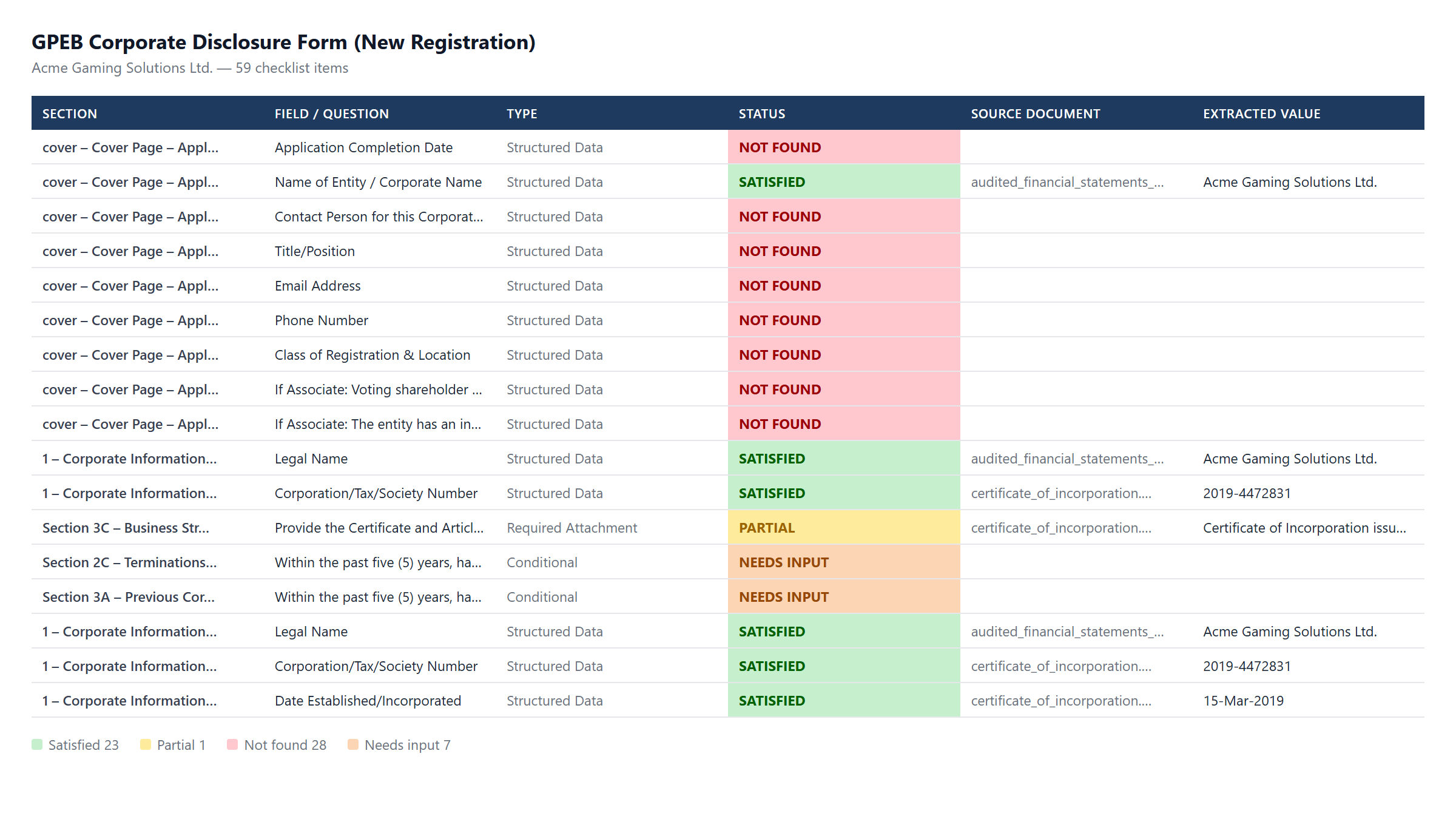
The scan is the per-client step. Every PDF and Word document in the client's folder is read and compared against the schema, and the tool writes a status for each item along with the source file and the extracted value. Items come out as satisfied, partial, not found, or needs input. Needs input is reserved for the conditional questions, which require an answer from the client rather than a document — whether any related entity has had a licence refused in the past five years, for example.
Output
Run against a sample company with five corporate documents on file, the 59-item form comes out as 23 satisfied, 1 partial, 28 not found, and 7 needing input. Roughly 40% of the form is answerable from documents already held, and the checklist records which items those are and which file each answer came from.
Twelve of the sections require a document to be written rather than an existing record — a schedule of current gaming licences, a business relationship chart, a statement of outstanding claims. The tool generates a Word document for each, drafted from the scanned material where the scan found something to work from, and otherwise a structured skeleton with placeholders for the lawyer to complete. On this sample all twelve come out as skeletons, since the sections requiring a generated attachment are the ones the client's five documents say nothing about.
How it was built
Built in Python with the help of Claude Code. Source is not public, but I am happy to walk through it.